Summary
TLDR: Want to know if you’re vulnerable? Together with this post we’re releasing https://ghost-sender.com/ — a tool that can be used to test your organization.
Using Exchange Online (or on-premises exchange in hybrid mode) in combination with an external MX record, such as a third-party email server or spam protection solution, can allow the spoofing of emails from any sender to any recipient in the target tenant.
This is regardless of the configured SPF, DKIM, and DMARC policies of the spoofed sender’s domain, and the emails are delivered without any further warning. It is possible to send emails from anyone, including external and internal email addresses. For internal senders, Outlook even resolves the sender’s profile picture.
Our research indicates this is a widespread and systematic misconfiguration and based on a preliminary analysis at the time of writing under half the environments with an external MX record have a mitigation applied. Of scanned bugbounty domains, over 20% of the ones using Exchange Online appear to be vulnerable.
Active abuse: Based on information provided by Microsoft support, this issue or an adjacent one appears to be actively being abused. This is also reflected by the fact that Microsoft deployed and then rolled back a mitigation to the internal spoofing attack. Further details can be found in the Disclosure Timeline.
Introduction
During an engagement, we noticed that by sending emails directly to Exchange Online and bypassing the customer’s email filtering solution specified in the MX record, we could deliver arbitrary emails, from any sender, straight to the user’s inbox. This was the case for both internal and external senders, and regardless of the sending domain’s SPF, DKIM, and DMARC policies. Further research revealed that this is not an isolated incident and that there is no clear indicator or warning in any security dashboards or configuration analyser that a domain may be vulnerable.
Impact
For vulnerable organizations, it becomes possible to spoof emails from arbitrary senders. Among other things, this could be used for:
- Sending fake bills (for example from
billing@microsoft.com) to the organization - Conducting phishing campaigns or CEO fraud with internal senders
- Conducting phishing campaigns with arbitrary external senders
Details
There are a lot of ways of configuring Exchange Online in combination with an on-premises email-filtering solution. As it turns out, only very few — and somewhat unintuitive — configurations appear to be secure. All others result in the tenant being vulnerable to Ghost-Sender. This allows an attacker to deliver email to those inboxes from any domain. While parts of Microsoft’s documentation and specific blog posts do discuss the secured configurations, the security impact is sparsely mentioned, and our analysis shows that in the majority of cases no mitigations are applied. Furthermore, no security or recommendation dashboards provided by Microsoft provide any warnings that this may be a problem.
An example of this can be seen in the following listing — it shows an email received from noreply@microsoft.com, despite microsoft.com having properly configured DKIM, DMARC, and SPF policies. The headers also clearly show that SPF, DKIM, and DMARC checks fail and the action oreject is supposedly applied. Regardless, the message is delivered straight to the inbox without any further warning:
Authentication-Results: spf=fail (sender IP is redacted)
smtp.mailfrom=microsoft.com; dkim=none (message not signed)
header.d=none;dmarc=fail action=oreject
header.from=microsoft.com;compauth=none reason=451
Received-SPF: Fail (protection.outlook.com: domain of microsoft.com does not
designate redacted as permitted sender)
receiver=protection.outlook.com; client-ip=redacted; helo=redacted;
Received: from redacted (redacted) by
ZRH2EPF0000014F.mail.protection.outlook.com (10.167.241.20) with Microsoft
SMTP Server id 15.20.9846.18 via Frontend Transport; Mon, 27 Apr 2026
08:01:43 +0000
MIME-Version: 1.0
From: noreply@microsoft.com
To: admin@redacted.com
From a technical perspective, Exchange Online by default accepts any incoming emails if an external MX record is used, regardless of the status of SPF, DKIM, and DMARC for the incoming email. 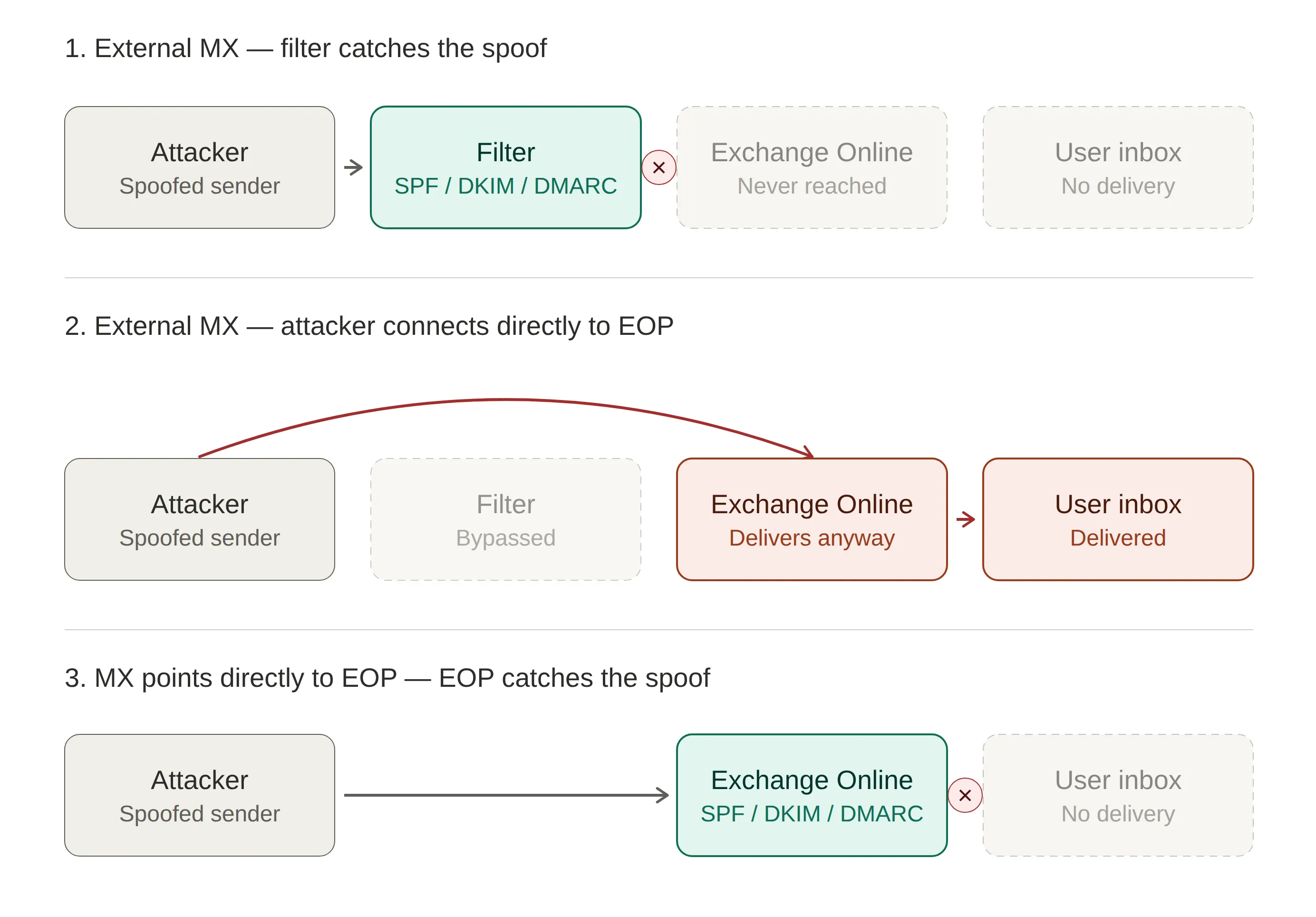
Visual overview of how the “attack” works.
This can then be abused with a short PowerShell one-liner:
Send-MailMessage -SmtpServer redacted-com.mail.protection.outlook.com -To admin@redacted.com -From noreply@example.com -Subject "Spoofed Ghost-Sender Email" -Body "This email was sent using the Ghost-Sender vulnerability. https://labs.infoguard.ch/posts/ghost-sender/" -BodyAsHTMLConfigurations
This section describes some of the identified configurations. The following table provides an overview:
| Configuration | Secure | Notes |
|---|---|---|
| MX record pointing to Exchange Online Protection | ✅ | All inbound mail traverses EOP filtering. |
| External MX record, no further configuration | ❌ | Default state when fronted by a third-party filter. |
| ”Your organization’s email server” connector (cert or IP auth, ± Enhanced Filtering) | ❌ | Connector does not enforce rejection of unauthenticated senders. |
| Preset or custom anti-phishing / anti-spam policies | ❌ | “Honor DMARC” does not apply to mail sent directly to the tenant. |
”Partner Organization” connector, * wildcard, restricted by certificate or IP | ✅ | Microsoft-recommended mitigation. |
Transport rule (priority 0) quarantining mail not from approved IPs / with AuthAs: Internal | ✅ | Microsoft-recommended mitigation; requires a maintained IP allowlist. |
1. MX record pointing to Exchange Online Protection
If the MX record points to Exchange Online Protection, the organization is not vulnerable to Ghost-Sender.
~ dig +short MX redacted.com
10 redacted-com.mail.protection.outlook.com.
Note 09.06.2026: Various configurations have been observed, where even if the MX record points to Exchange Online Protection, internal spoofing emails, as sent by the testing tool, still work. This is not directly related to the Ghost-Sender vulnerability but arises from the combination of a p=none DMARC policy and DirectSend being enabled. In these configurations we recommend hardening the DMARC configuration (after verifying that all legitimate emails have a valid DMARC response) and disabling DirectSend (after verifying it is no longer used).
Note 10.06.2026: The testing tool has been updated to additionally flag such cases as potentially dangerous.
2. External MX record no further configuration
If an external MX record is used and no further configurations are made, the organization is vulnerable to Ghost-Sender. Any emails sent directly to Exchange Online are delivered straight to the inbox.
~ dig +short MX redacted.com
10 mxb.eu.mailgun.org.
Microsoft’s documentation is inconsistent on this — some pages do warn that the configuration is dangerous (for example, the anti-phishing policies guide), while other pages imply that no further configuration may be required:
Example of where Microsoft documentation implies no further configuration is required.
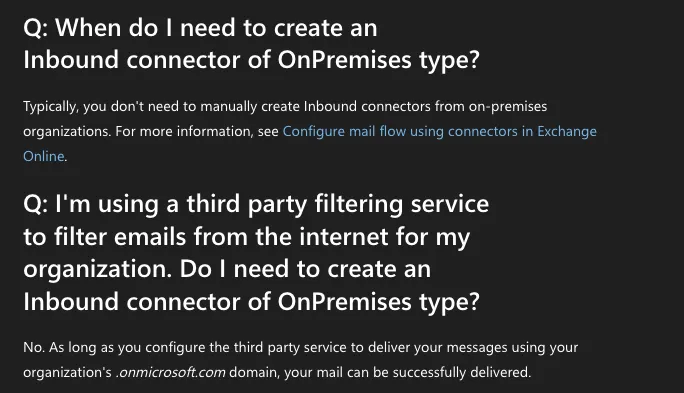
As can be seen in the following screenshot, arbitrary emails are sent and delivered straight to the user’s inbox in this situation. This includes for example emails from Microsoft and the recipient’s domain: 
Successful delivery of spoofed emails.
Furthermore, Microsoft’s Configuration Analyzer also does not show any warning or recommendations in this case. There is no visible warning anywhere that the configuration may be vulnerable.
Generally, any anti-phishing and spam policies that enforce “Honor DMARC Policies” on Exchange also do not have an effect. This is also briefly mentioned in the official documentation:
If the MX record for the Microsoft 365 domain points to a non-Microsoft service or device that sits in front of Microsoft 365, the Honor DMARC policy setting is applied only if Enhanced Filtering for Connectors is enabled for the connector that receives inbound messages.
A note on Direct Send:
- Ghost-Sender effectively allows abusing Direct Send regardless of the configured SPF/DMARC policy.
- Disabling Direct Send prevents Ghost-Sender from spoofing internal senders but does not protect against the spoofing of any external senders.
3. “Your organization” connector with Enhanced Filtering
Setting up a standard connector with Enhanced Filtering does not mitigate the issue either. Based on the naming, the obvious choice for connector would be to choose one with the source being “Your organization’s email server” when you have an on-premises filtering solution. 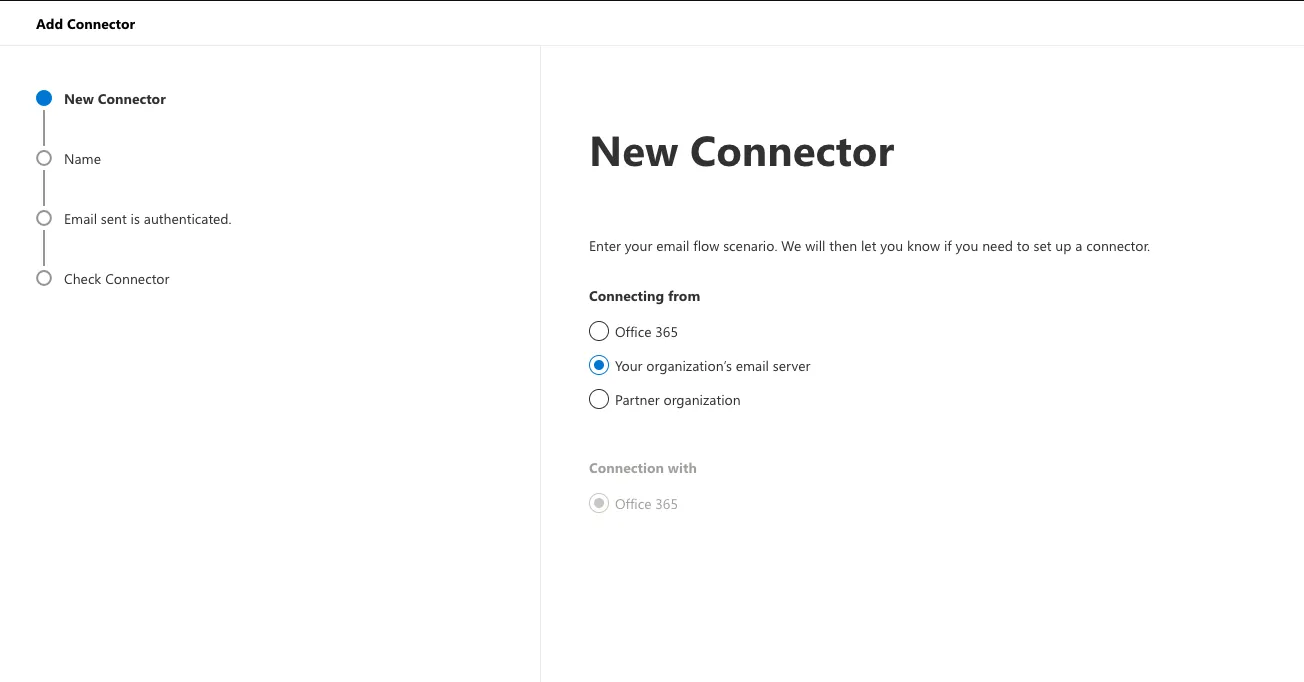
New connector setup.
Then you can configure “authentication” for the connector with either certificate or IP: 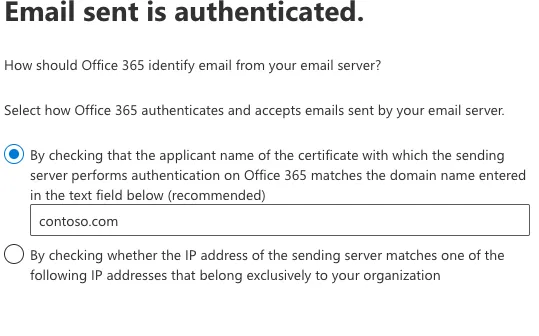
Authentication options for the connector.
As it turns out though, regardless of whether certificate or IP-based “authentication” is used, the setup does not reject any emails and all emails are still delivered directly to the user’s inbox: 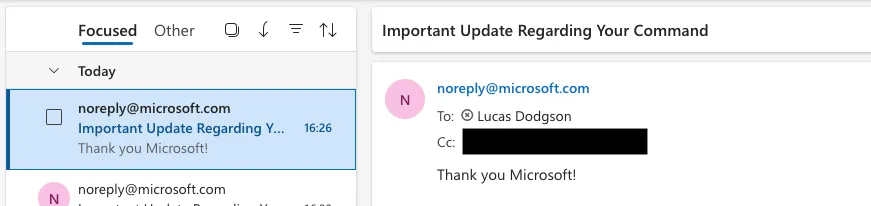
Despite the connector being set up with certificate authentication, emails continue to be directly delivered.
Based on Microsoft’s documentation, this is somewhat expected and applying Enhanced Filtering is required - however, even with Enhanced Filtering enabled, the email is still delivered without any indicator at all: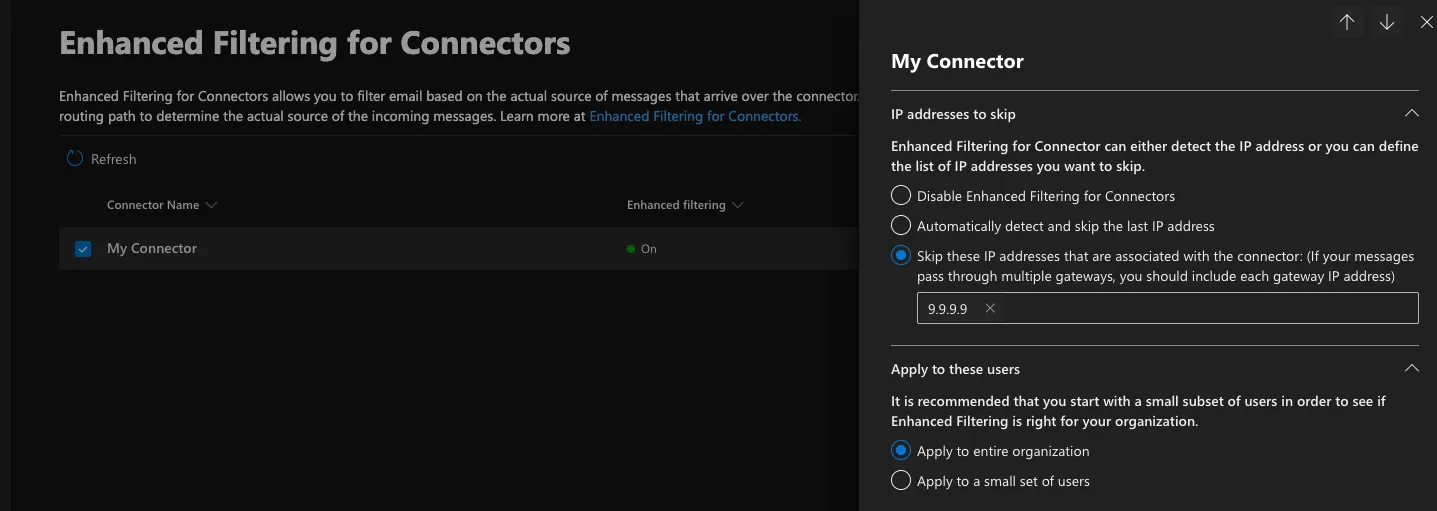
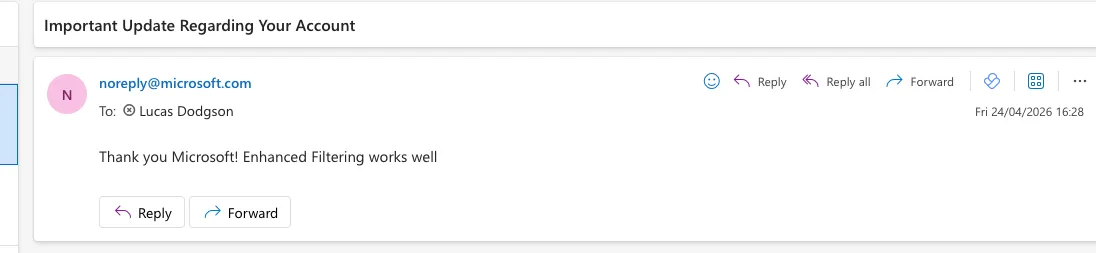
Mail delivery even if Enhanced Filtering for Connectors is enabled.
4. Preset security policies
In combination with the configured connector, we can also enable both the “Standard Protection” and the “Strict Protection” presets for our users. 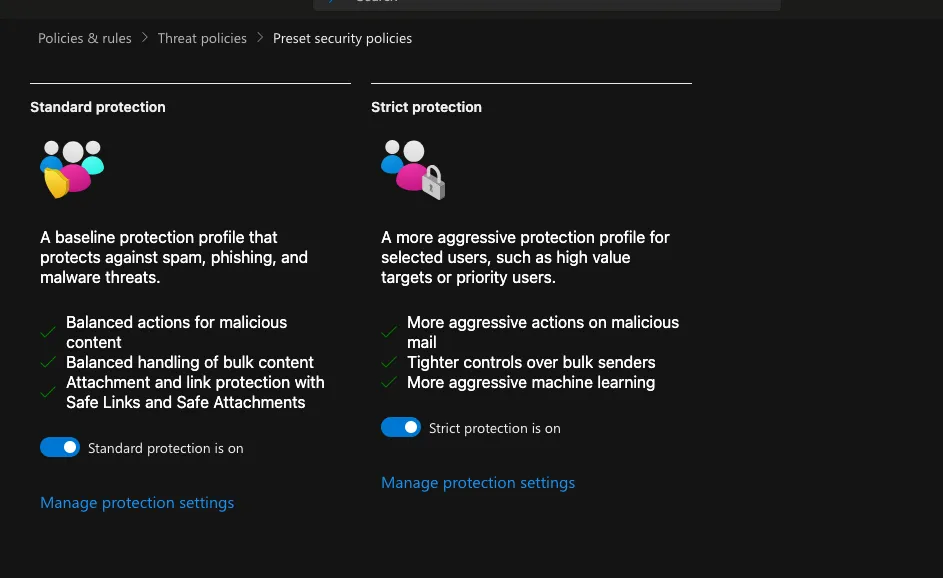
The available presets.
However, even with these — the spoofing is still arbitrarily possible: 
Mail delivery even when both standard and strict protection presets are enabled.
Furthermore, we validated the same behaviour with a custom anti-phishing policy. Mails were delivered regardless. Again, no warnings were visible in the Configuration Analyzer that would indicate any further configurations need to be performed.
DMARC and Ghost-Sender mails landing in junk:
There was one environment we observed in which the standard Ghost-Sender emails landed in the junk folder. However, we were not able to reproduce this in a test-tenant (without an enterprise license). Furthermore, this only offered a partial protection — for any sending domain without DMARC or a p=none policy, even with correctly configured SPF, the mails were delivered without any warning, regardless of other configurations. When not sent through Ghost-Sender these emails were instead discarded due to the SPF policy of the sending domain.
5. “Partner Organization” connector
A partner organization connector is one of the two mitigations we could identify. During the setup of such a connector, there is an additional step that does not appear for the “Your Organization” connector. This allows the configuration of additional security restrictions, including the rejection of any emails that are not sent with specific certificates or IPs.
We identified around 25% of affected entities to be configured with such a connector deployed in a way that prevents the attack.
When applied correctly, Exchange gives the following response to the RCPT TO command:
5.7.51 TenantInboundAttribution; Rejecting.
Recipient has a partner connector with RestrictDomainsToIPAddresses or RestrictDomainsToCertificate set.
However, even when setting up a partner organization connector, it is important to set up the connector to match * for identifying the partner. Otherwise, as can be seen in the following two screenshots, the email send still works. 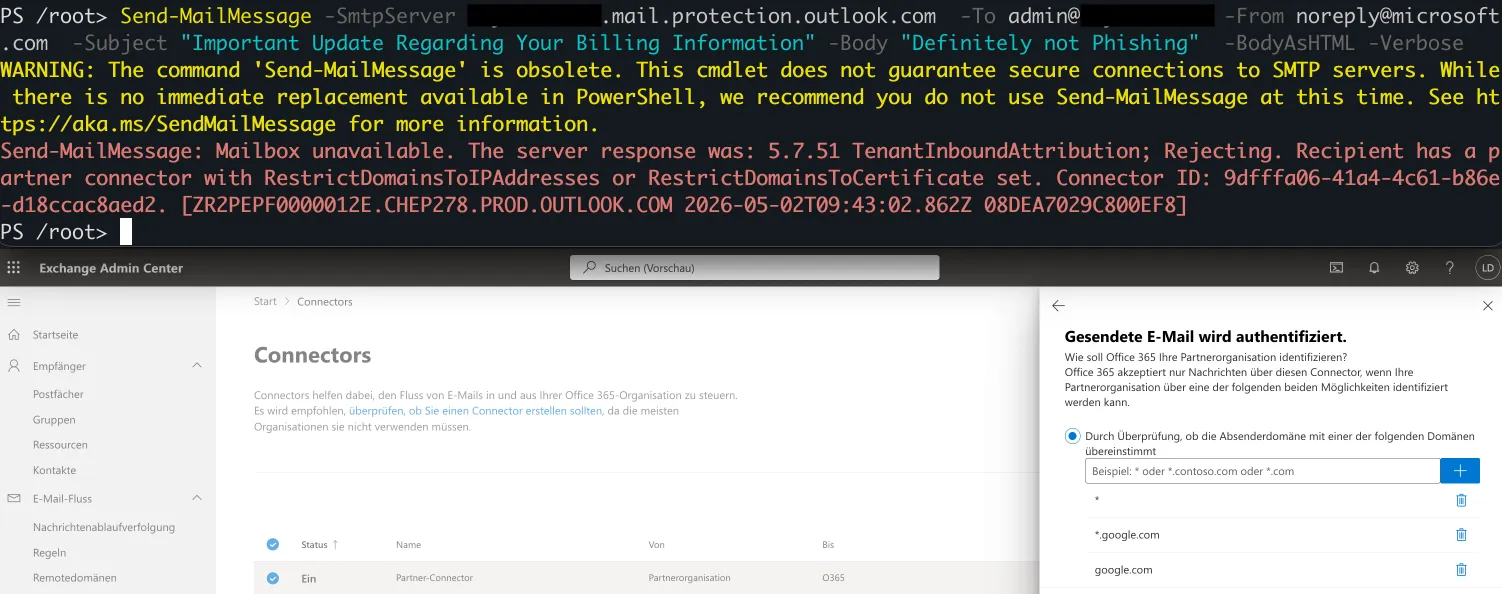
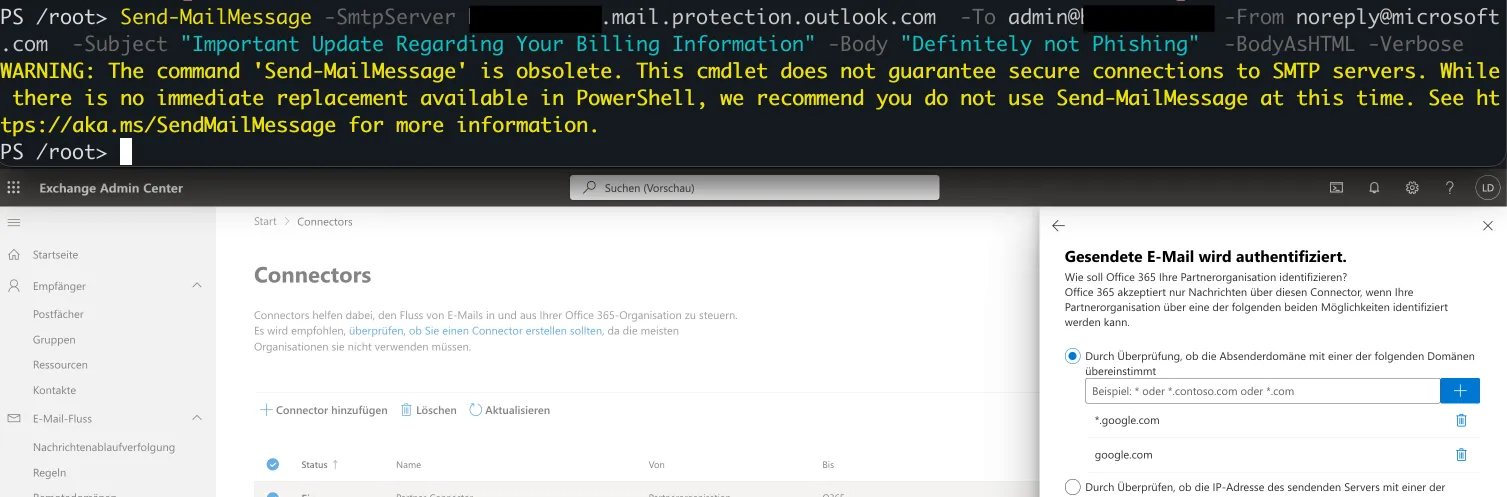
Partner organization connector configurations showing that the wildcard entry is required.
6. Transport rule
The second identified mitigation is to configure a transport rule (mail flow rule) that quarantines any inbound message that does not match an approved sender IP range or carry the X-MS-Exchange-Organization-AuthAs: Internal header. Unlike the partner organization connector, email is still accepted at the SMTP layer and only intercepted afterwards. Therefore, this approach can be helpful when visibility into what would have been blocked is desired.
The rule should be configured as recommended by Microsoft:
- Apply this rule if: Apply to all messages
- Do the following: Deliver the message to the hosted quarantine and Stop processing more rules
- Except if: sender IP addresses belong to one of these ranges:
<MX provider IPs + other authorised IPs expected to send email directly to EOP>OR theX-MS-Exchange-Organization-AuthAsheader containsInternal - Priority: 0
When applied correctly, a spoofed mail sent directly to the tenant’s *.mail.protection.outlook.com endpoint is intercepted and placed into the hosted quarantine rather than the user’s inbox.
Mitigations
If you use Exchange Online (or on-premises exchange in hybrid mode) with an external MX record, the following steps are recommended to ensure your organization is not vulnerable:
- Apply one of the two Microsoft recommended mitigations:
- Set up a partner organization connector that applies to emails being sent from any domain (wildcard entry) and rejects emails based on either IP or certificate based validation. It should be ensured that the configuration does not reject emails forwarded by the on-premises mail server.
- Create a mail flow rule that quarantines all emails where the
X-MS-Exchange-Organization-AuthAsheader is not set toInternaland where the IP address does not belongs to one expected to send emails to Exchange Online (such as the mail server the MX record points to).
- Ensure mitigation was successful with the test tool: https://ghost-sender.com/
- This performs some basic fingerprinting checks and validates whether the partner organization mitigation is applied. It also provides the option of sending a test spoofed email that can be used for verification.
- Note: the mail flow rule mitigation cannot be fingerprinted directly by the tool. However, sending a test email validates whether it is being applied properly.
- Note: based on our observations, the mitigations can sometimes take up to an hour to apply properly.
- Disable Direct Send - this provides protection against internal spoofing and disables Direct Send attacks as well.
Detection Challenges
Added 10.06.2026: Reliable Indicators of Compromise (IoCs) in the traditional sense do not exist, especially across a multitude of different tenants, licenses, and configurations. We evaluated various exchange log values available in the Exchange Admin Center and Defender for Office 365, but were unable to find any reliable source that could definitively indicate a Ghost-Sender spoofed email in all cases. Because of this, the most viable detection option is to check the headers of all incoming emails for discrepancies in the mail gateway flow. To correctly spoof this information during a ghost-send, an attacker would require specific internal information, such as the internal IP addresses and hostnames of the appliances along the organization’s mail path.
Disclosure Timeline
We initially reported this issue to MSRC, however they closed the issue as a non-MSRC case as they did not view this as a security vulnerability and directed us to report this to general Microsoft support instead.
| Date | Event |
|---|---|
| 2026‑04‑21 | We reported the vulnerability along with various configurations and adjustments we performed to MSRC. |
| 2026‑04‑21 | MSRC closed the issue as not a vulnerability and a “non-MSRC case”, and asked us to report this as a general bug. |
| 2026‑04‑22 | Follow-up message to MSRC, that still has not been answered. Edit: answered on the 10th of June (see below) |
| 2026‑04‑22 | Initial contact with general support. |
| 2026‑04‑22 | General support reveals an active widespread email-spoofing campaign starting on the 21st of April. |
| 2026‑04‑22 | Internal spoofing fixed; external spoofing remains possible. |
| 2026‑04‑22 | Follow-up to general support. |
| 2026‑04‑24 | Further follow-up to general support. |
| 2026‑04‑27 | Internal spoofing mitigation reverted. |
| 2026‑04‑28 | Microsoft general support reports that the incident is resolved and no further spoofing should be possible. Ghost-Sender still works. |
| 2026‑05‑05 | Microsoft general support says they require specialized technical input and require additional time. |
| 2026‑05‑29 | Microsoft general support states this is not a product vulnerability but instead a known architectural limitation. They suggest either changing the MX record to M365 or adding additional headers in forwarded emails (which doesn’t fix the issue). |
| 2026‑06‑10 | (Day after publication) - MSRC reopens the case. |
Conclusion
Ghost-Sender is a misconfiguration enabling the delivery of arbitrary phishing emails against a large number of Exchange Online tenants. The prerequisites are minimal: a target domain with an external MX record, a guess at the tenant’s *.mail.protection.outlook.com endpoint, and an SMTP client. The result is inbox delivery of arbitrary internal or external senders, including resolved profile pictures for internal senders. Defenders should assume the technique is in active use, validate their configuration at https://ghost-sender.com/, apply one of the mitigations above, and disable Direct Send.
Acknowledgements:
This didn’t happen in a vacuum. Thanks to everyone who contributed (in alphabetical order):
- Corinne Moser
- Dario Weiss
- Manuel Feifel
- Marcel Schmid
- Mario Bischof
- Martin Hüsser
- Philippe Vetterli
- Tobias Wyssling