In this post I am sharing the first public release of velociraptor-skills, a set of reusable AI skills for DFIR with Velociraptor.
These skills guide artifact selection, collection, hunting, analysis and context management. They use a shared Python harness, vraptor, through a command-line interface rather than an MCP server or individual AI tools. The goal of using a separate harness is to optimise token use, control performance and standardise the format of generated analysis notes.
| Name | Description |
|---|---|
prep-dfir-tools | Install or refresh DFIR tooling, including vraptor, Velociraptor, Plaso, Volatility 3 and Sleuth Kit. |
velociraptor-engagement-setup | Start or resume live and mapped-evidence investigations, configure connections and verify readiness. |
velociraptor-live-api-client | Set up and connect to a live Velociraptor instance via API, retrieve configuration, run VQL and find clients. |
velociraptor-mapped-client | Map offline clients into a live Velociraptor instance or local GUI. |
velociraptor-artifact-selection | Select artifacts and detection scenarios, with policies for field selection, filtering, stacking and analysis. |
velociraptor-collection | Run or reuse single-host collections, monitor progress, analyse results and explicitly export evidence. |
velociraptor-host-analysis | Analyse one endpoint using exact-flow reuse and configurable AI reviewers for each artifact. |
velociraptor-hunting | Hunt across Windows, Linux and macOS; analyse results, correlate artifacts and support workflows such as DetectRaptor and Autoruns review. |
How do I set it up?
The skills were developed for use with Codex and OpenAI or Azure OpenAI. AI settings can be imported from Codex or configured manually. The skills can also be used with Anthropic, with Claude auto-configuration and API options, although Claude has not been tested thoroughly.
The example below uses a macOS machine to connect to an existing Velociraptor server and investigate its enrolled live endpoints. You will need Git, Python 3.11 or newer, network access to the server’s API and credentials for the selected AI provider.
The original version was built for an environment with multiple Velociraptor servers, each configured as a named server profile. The velociraptor-live-api-client and velociraptor-engagement-setup skills help configure access to these servers. You can point the installer to an existing Velociraptor API YAML file, or configure SSH so vraptor can help retrieve the required configuration.
Data handling and security
Before sending investigation data to a frontier model vendor, understand your requirements for data residency and retention. Your policy may require a private or on-premises deployment with a suitable local model. The Velociraptor skills will require consideration of both the coordinating harness and the analysis workers.
Another important consideration is forensic evidence can contain attacker-controlled data, including indirect prompt injections intended to redirect the agent or influence its findings. Treat evidence as untrusted data and reduce risk through sandboxing, least-privilege credentials, restricted network access, structured output validation and explicit approval for sensitive actions. For Codex, see OpenAI’s guidance on agent approvals and security for sandboxing, approvals and network controls.
Install and configure
Clone the repository and run the installer:
git clone https://github.com/ig-labs/velociraptor-skills.git
cd velociraptor-skills
./utils/install.sh
The installer creates or reuses a Python virtual environment, adds the repo to PATH and opens the setup configuration wizard: vraptor setup configure. The most important setting is the investigation parent directory, where case notes and investigation data are stored. Also provide the Velociraptor API configuration path or set up SSH to retrieve it automatically.
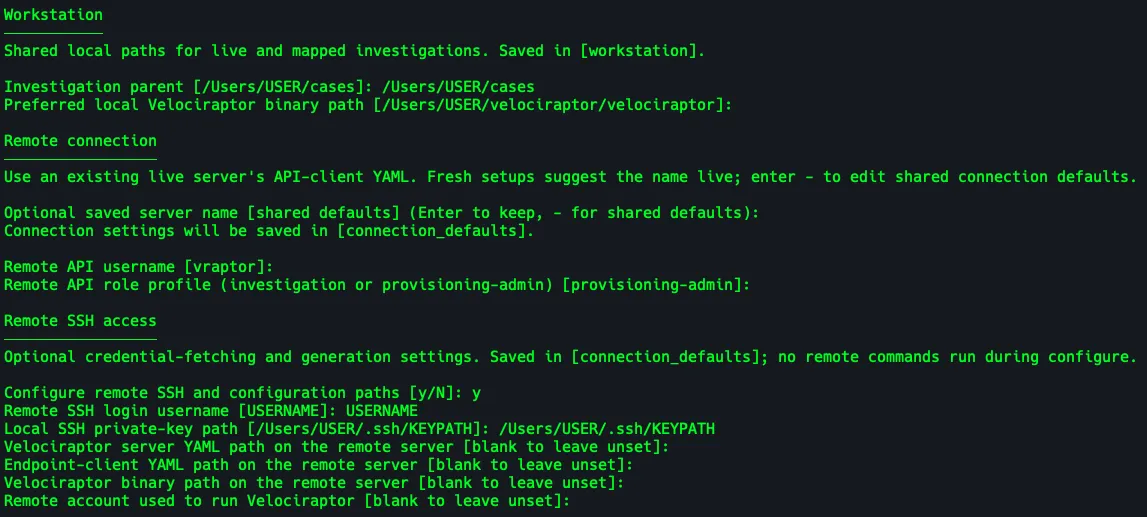
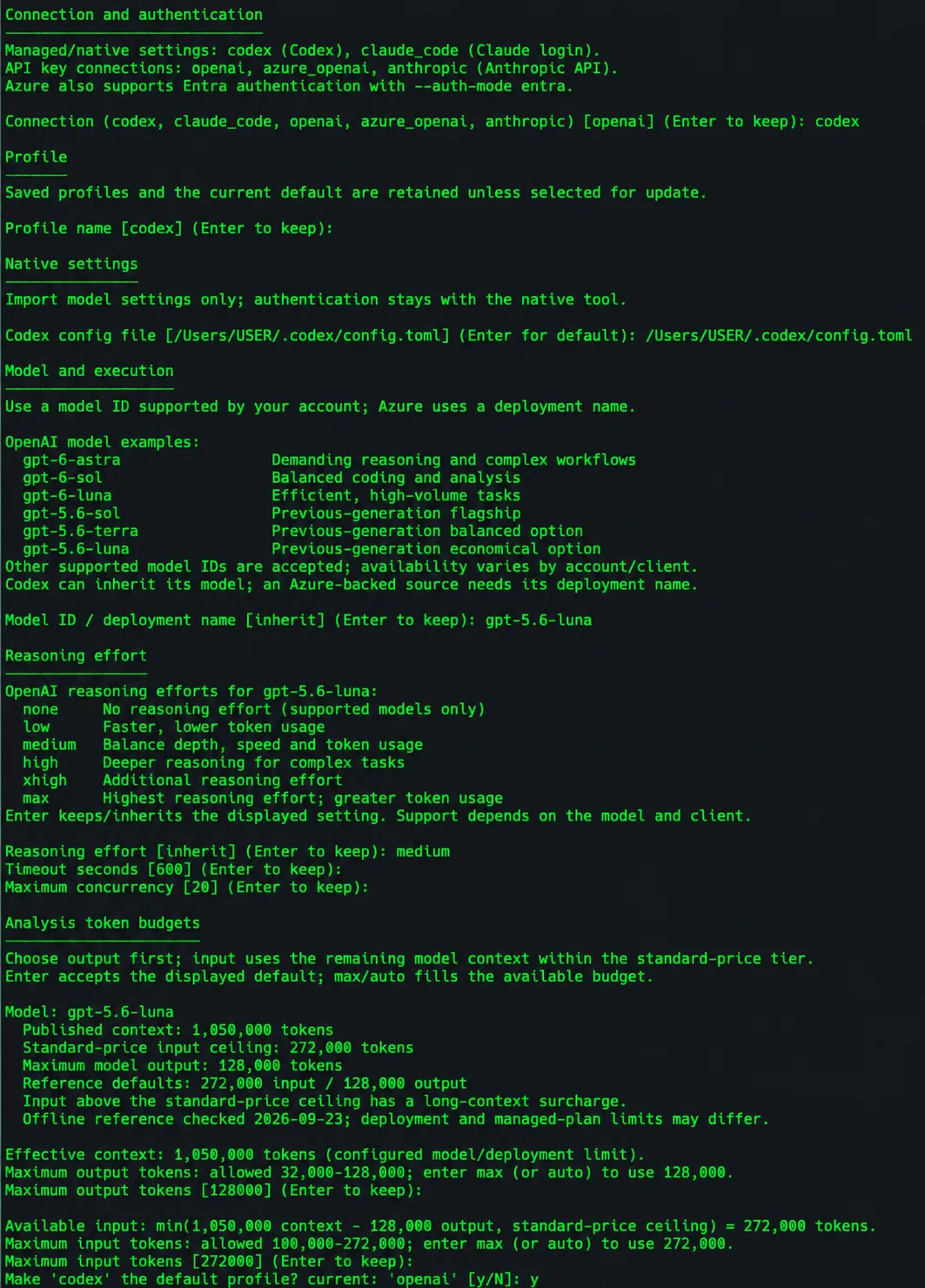
AI analysis can also be configured in the setup wizard or by running vraptor ai setup. In the example below, I am pointing the setup wizard to Codex.
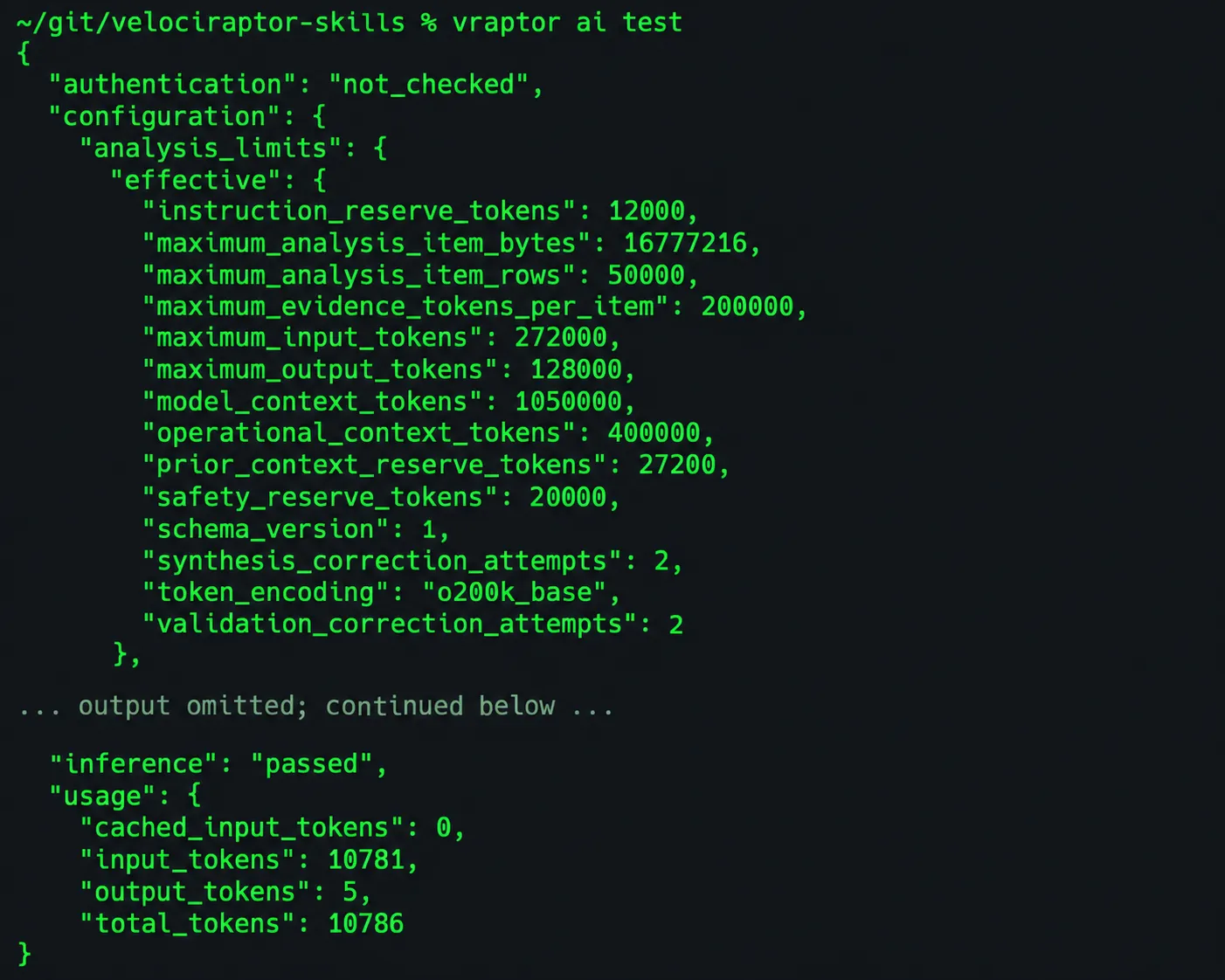
To test the AI configuration, run vraptor ai test and check for inference: passed.
Other supported connections and the full setup options are covered in the installation guide.
The next step is to install the skills to your main harness to enable prompting. For Codex, we can preview and install the skills as symlinks using ./utils/link-codex-skills.sh.
Set up a case
With the skills installed, you can now prompt Codex and use velociraptor-skills.
In our lab example: the command below will generate a config over ssh.
vraptor config fetch-api --server-profile dfir \
  --server-ip dfir.velociraptor.rocks --provision-api --force
NOTE: You can skip this step if you have already configured the Velociraptor API config and jump straight into prompting.
Replace dfir with your server profile name and dfir.velociraptor.rocks with your server’s IP address or FQDN. This uses the configured SSH account, key and remote paths. --provision-api allows missing API credentials to be generated; --force refreshes the local copy instead of reusing its cache. The example saves the API-client YAML to ~/.config/velociraptor/<SERVER PROFILE>_api_client.yaml. Subsequent API connections use this file.

Once API access is configured, we can prompt Codex to set up a Velociraptor investigation:
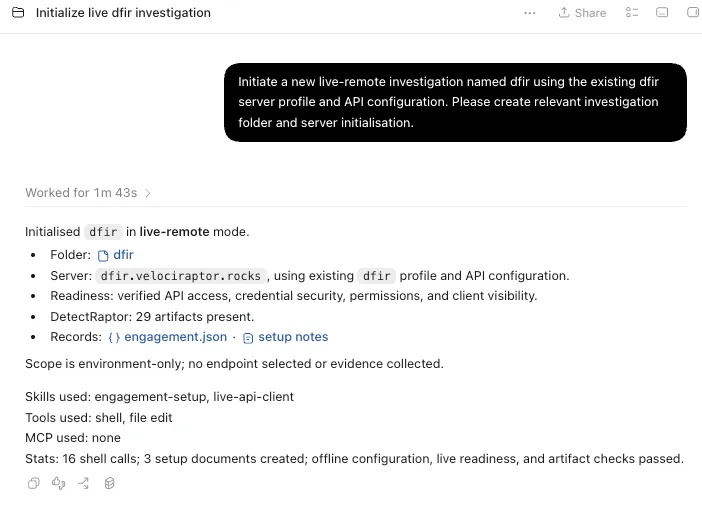
Initiate a new live-remote investigation named dfir using the existing dfir server profile and API configuration. Please create relevant investigation folder and server initialisation.
The prompt asks Codex to initialise the investigation using the saved server profile and API configuration. The response below reports the investigation folder, verified API access, credential security, permissions and client visibility. It also confirms 29 DetectRaptor artifacts are present and links to engagement.json and the setup notes. The scope is environment-only: no endpoint is selected and no evidence is collected.
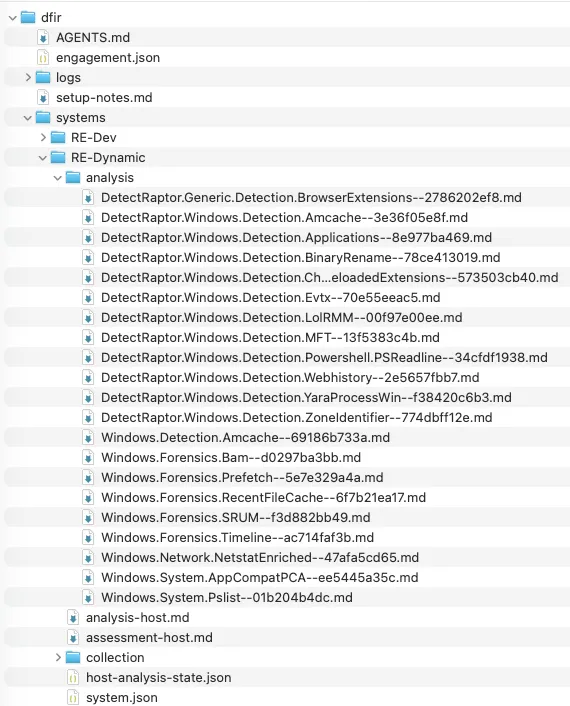
The generated AGENTS.md provides case context and investigation guidance from the editable investigation template.
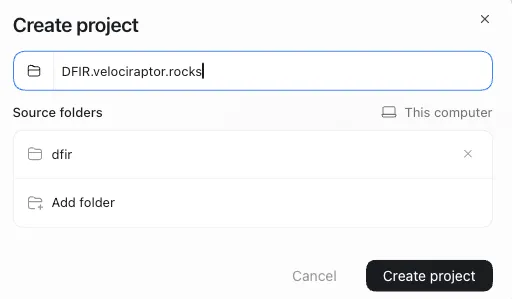
After setup, add the investigation folder to a local Codex project and make it the primary folder - in our example ~/cases/dfir. Codex uses the primary folder to discover AGENTS.md, so the case guidance is available alongside your investigation notes.
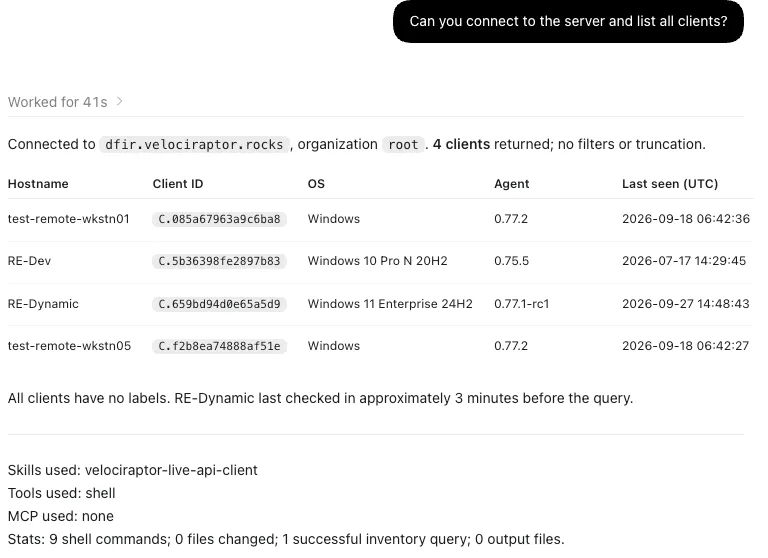
Querying hosts
From the case project, ask Codex to list the clients on the configured server:
Can you connect to the server and list all clients?
The response below lists four clients with their hostname, client ID, operating system, agent version and last-seen time.
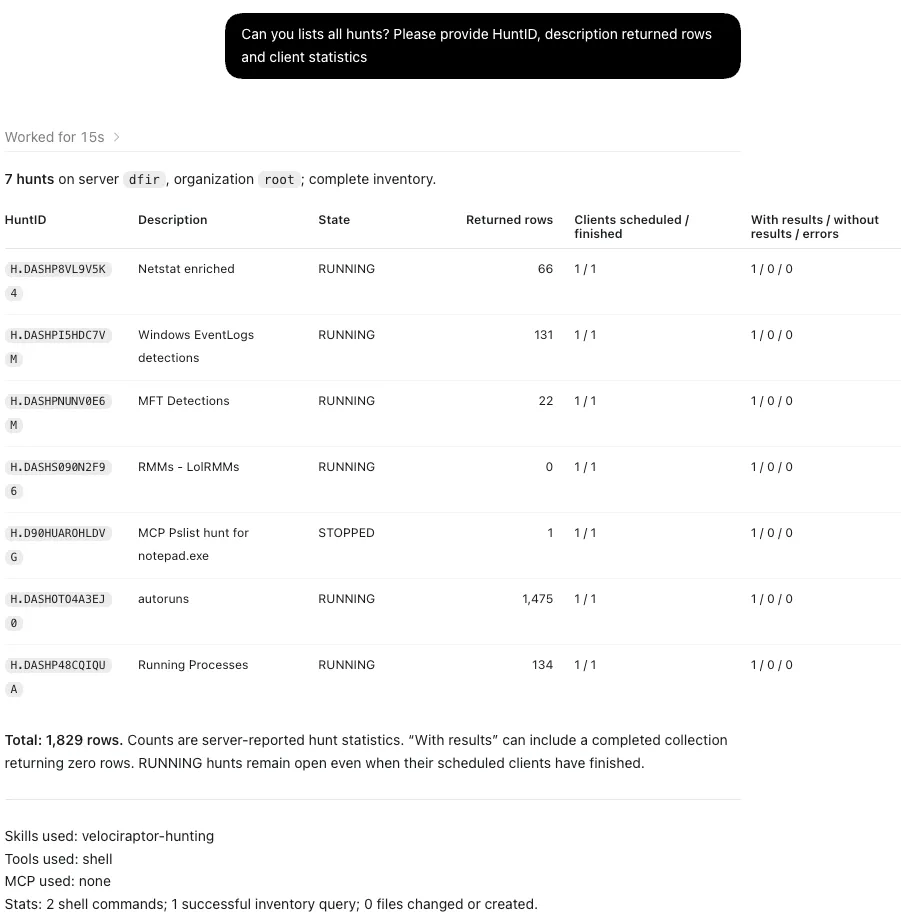
Querying hunts
Ask Codex to list the existing hunts and their collection statistics:
Can you list all hunts? Please provide the hunt ID, description, returned rows and client statistics.
The response below lists seven hunts with their state, returned row counts and client completion and error statistics. I typically use the hunt ID to select an existing hunt for review and run analysis over precollected hunts or correlate results over several data sources.
Collecting and analysing host evidence
Select a host and describe the evidence you want reviewed. This example analyses existing host evidence and asks for a review of DetectRaptor collections:
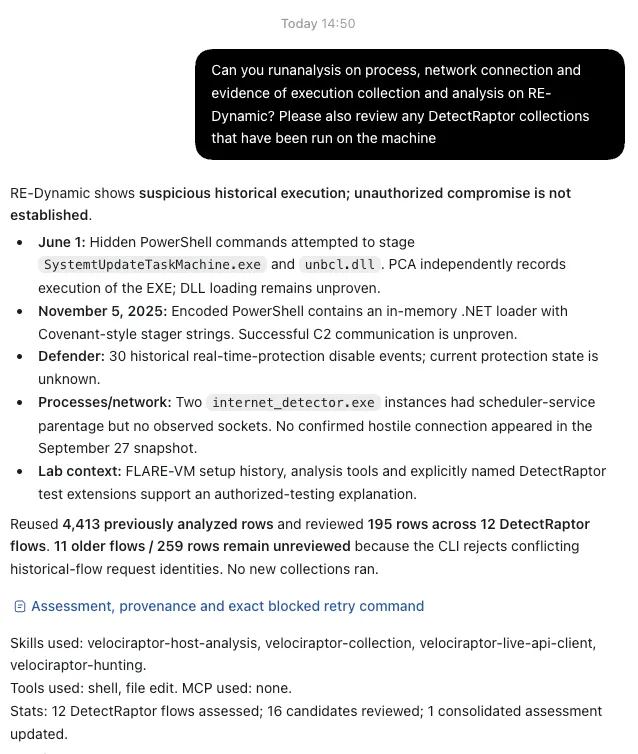
It’s worth noting: both hunt and host analysis skills check existing collections as an optimisation before requesting a new collection.
Analysis reports and reviewed assessments
Host and hunt analysis both separate generated analysis reports from reviewed assessments. Host reports live under systems/<host>/ in the case folder; hunt reports live under hunts/<hunt-id>/.
| Record | Host file | Hunt file |
|---|---|---|
| Generated analysis | analysis-host.md | analysis-hunt.md |
| Reviewed assessment | assessment-host.md | assessment-hunt.md |
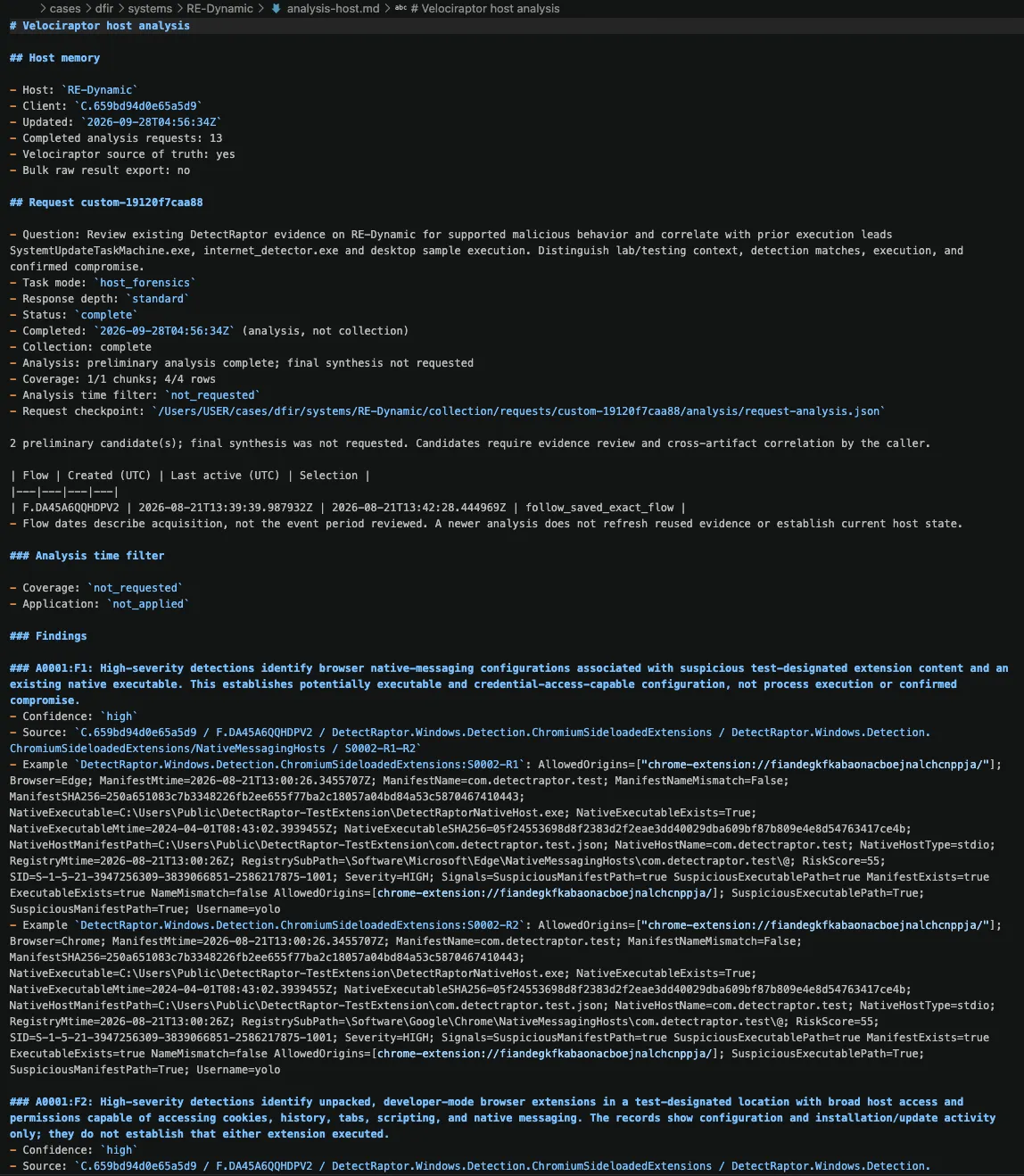
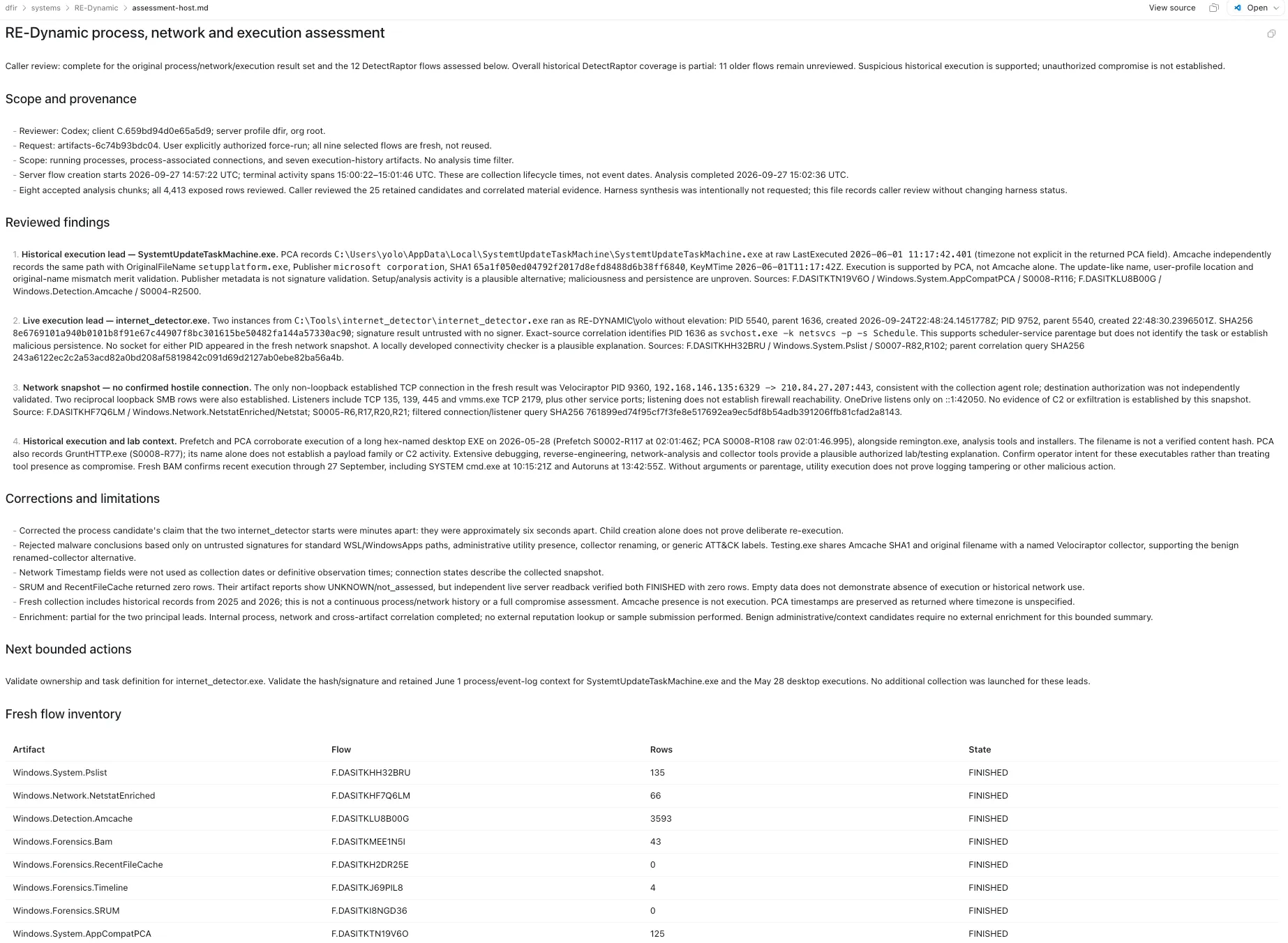
The generated analysis reports record source references, processing status, coverage and model findings. The assessment is written by the calling agent or analyst after reviewing source evidence and correlating findings across artifacts or hosts. It records conclusions, corrections, unresolved leads and coverage limitations.
Host analysis also provides individual artifact reports for inspecting the findings and coverage of each analysed artifact alongside the combined host report.
The screenshot below shows analysis-host.md. This version lists 13 completed analysis requests and shows one DetectRaptor request with four reviewed rows and two preliminary candidates. The findings distinguish browser-extension configuration from confirmed execution or compromise. Its complete status describes the analysis run; final synthesis was not requested and the candidates still require review. The same distinction applies to hunt analysis.
The assessment-host.md screenshot shows Codex’s subsequent review of the host analysis.
Final thoughts
The aim of velociraptor-skills is to make AI useful throughout a Velociraptor investigation or hunt. The examples here cover case setup and the core workflow. Custom VQL support extends this to questions and server tasks beyond the packaged workflows.
During development, I have tried to address some of the challenges of using AI with Velociraptor at scale. In future posts, I plan to share more focused use cases, including detection, large-scale data processing, dead-disk forensics and agent personas.
The code, skills and configuration examples are available in velociraptor-skills. Feedback on the workflows and pull requests are welcome.